mirror of
https://github.com/1Remote/1Remote.git
synced 2026-04-25 13:36:03 +03:00
[GH-ISSUE #342] Launcher keyshortcut not working when main Window in secondary screen #1258
Labels
No labels
area-configuration
area-ct-app
area-ct-rdp
area-ct-remoteapp
area-ct-ssh
area-ct-vnc
area-launcher
area-list
area-tags
area-teamwork
bug
chore
dependencies
general-build/ci
general-performance
general-refactor
general-security
general-supportive
general-ux
meta-documentation
meta-enhancement
meta-enhancement
meta-feature
meta-help-wanted
meta-unknown-error
priority-hi
priority-low
pull-request
question
resolution-duplicate
resolution-invalid
resolution-wontfix
stale
task-put-off
task-still-considering
task-working-in-progress
No milestone
No project
No assignees
1 participant

Notifications
Due date
No due date set.
Dependencies
No dependencies set.
Reference
starred/1Remote#1258
Loading…
Add table
Add a link
Reference in a new issue
No description provided.
Delete branch "%!s()"
Deleting a branch is permanent. Although the deleted branch may continue to exist for a short time before it actually gets removed, it CANNOT be undone in most cases. Continue?
Originally created by @DaWy on GitHub (Jan 13, 2023).
Original GitHub issue: https://github.com/1Remote/1Remote/issues/342
OS: Windows 11 Pro
Version: 21H2
PRemoteM: 0.7.2.1
When having 2 displays, If I move the main PremoteM connection window to the secondary screen, and my mouse is in the primary screen, the launcher shortcut doesn't work.
When connection window is in the primary screen, the shortcut works on both screens, very weird.
So, a table detailing the cases with ALT+M issue:
Extended mode. Mouse on PRIMARY, Window on SECONDARY: Not Working
Extended mode. Mouse on SECONDARY, Window on SECONDARY: Working
Extended mode. Mouse on PRIMARY, Window on PRIMARY: Working
Extended mode: Mouse on SECONDARY, Window on PRIMARY: Working
@VShawn commented on GitHub (Jan 14, 2023):
very weird...
actually I have 3 displays.
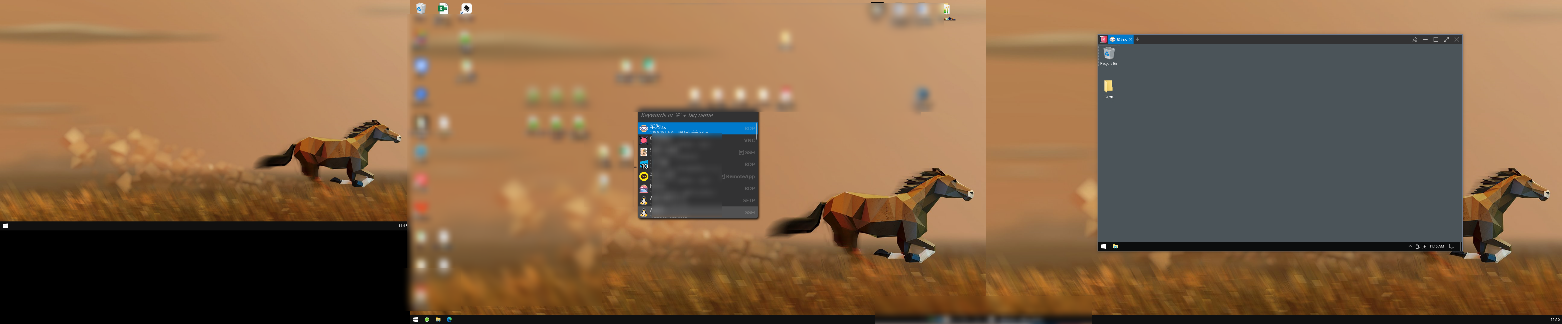
Extended mode. Mouse on PRIMARY, Window on SECONDARY: Working for me
@VShawn commented on GitHub (Jan 14, 2023):
could you please check you log, and find out if there was some log shows
Call shortcut to invoke launcher Visibility = Hiddenafter it not working?log files located here if you are testing on microsoft store version:

if you can find
Call shortcut to invoke launcher Visibility = Hiddenthen it ture outalt + mwas recognized.@DaWy commented on GitHub (Feb 21, 2023):
Sorry for the delay, been busy these days. I found the culprit. When Windows screen scale is changed in to any value more than 100%, it happens the behaviour I posted in the issue.
Only happens when:
*Mouse on PRIMARY screen, Window on SECONDARY screen
If I change back the window scale to 100% on the secondary screen, the launcher works again as expected.
About the logs... When doing the shortcut to show the launcher with the Window scale on secondary at 100%, log show this:
[T:001][09:45:09.576]DebugCall shortcut to invoke launcher Visibility = HiddenDoing this on Windows Scale at 150%, log show the exact same... I think problem is not launcher not showing, problem is launcher position is based on default scale. I noticed when changing screen scale, launcher windows moves to the right. Heres an example:
Scale settings:
Launcher windows not showing...
Scale settings:
Scale settings:
@DaWy commented on GitHub (Feb 21, 2023):
Ok I "temporaly" solved this. This only happens when changing scale while PRemote is running. If app is closed and opened again, issue is gone.
So seems that the issue is app is not "refreshing" in some kind Windows scale info, so when scale is changed while app is running, it does not update the position and scale of the launcher Window.
I'm not changing Windows scale every day, but well, its an issue, but not critical. So I think you can focus on other more important issues @VShawn
@VShawn commented on GitHub (Feb 24, 2023):
Yes I discovered this
scaleissue at the beginning of the project, and it seemed to be unfixable at the time. I need to confirm it again.