mirror of
https://github.com/1Remote/1Remote.git
synced 2026-04-25 13:36:03 +03:00
[GH-ISSUE #108] Multiple Log Errors for long active rdp sessions #1048
Labels
No labels
area-configuration
area-ct-app
area-ct-rdp
area-ct-remoteapp
area-ct-ssh
area-ct-vnc
area-launcher
area-list
area-tags
area-teamwork
bug
chore
dependencies
general-build/ci
general-performance
general-refactor
general-security
general-supportive
general-ux
meta-documentation
meta-enhancement
meta-enhancement
meta-feature
meta-help-wanted
meta-unknown-error
priority-hi
priority-low
pull-request
question
resolution-duplicate
resolution-invalid
resolution-wontfix
stale
task-put-off
task-still-considering
task-working-in-progress
No milestone
No project
No assignees
1 participant

Notifications
Due date
No due date set.
Dependencies
No dependencies set.
Reference
starred/1Remote#1048
Loading…
Add table
Add a link
Reference in a new issue
No description provided.
Delete branch "%!s()"
Deleting a branch is permanent. Although the deleted branch may continue to exist for a short time before it actually gets removed, it CANNOT be undone in most cases. Continue?
Originally created by @xperia-droid on GitHub (Apr 7, 2021).
Original GitHub issue: https://github.com/1Remote/1Remote/issues/108
Originally assigned to: @VShawn on GitHub.
Describe the bug
Most work days I have ~10 RDP sessions active in the background and reconnect to sessions every now and then.
Then I try to reconnect to an RDP session after some time (to not put a password in the lock screen) but then the RDP session is killed. I can then reconnect on all active RDP connections, but all are then gradually killed instead of connecting.
Since it is hard to see what is causing this, I used Notepad++ to search all .md logs under %appdata%\PRemoteM\Logs for the text "exit with error code". Thereby some messages came together.
Below the error messages summarized.
To Reproduce
Steps to reproduce the behavior:
Expected behavior
Working RDP behavior
Screenshots
If applicable, add screenshots to help explain your problem.
Desktop (please complete the following information):
Additional context
RDP error 1 - No Idea why this occurs - could be nothing, but should be mentioned:
exit with error code 1(An internal error has occurred.)
RDP error 2 - No Idea why this occurs - could be nothing, but should be mentioned:
exit with error code 2(An internal error has occurred.)
RDP error 516 - Default Message when Server can't get connected, so it's normal behavior.
exit with error code 516(Remote Desktop cannot connect to the remote computer for one of the following reasons:
RDP error 3334 - Solution for mremote NG: https://www.batchworks.de/fix-rdp-error-3334-in-mremoteng-and-others/
Could you check this solution?:
exit with error code 3334(The session was disconnected due to a protocol error. Try to reconnect to the remote computer).
RDP error 3847 - Default password behavior, so it's OK:
exit with error code 3847(The user account password has expired. The password must be changed to log in. Update the password or contact the system administrator or technical support).
RDP error 4360 - Has something to do with bitmap Caching and that i'm using your software inside a vm: Connection=>RDP=>Experience=>Bitmap Caching
https://forum.asg-rd.com/showthread.php?tid=11016&page=3&highlight=3334
Could you check this please?:
exit with error code 4360(Reconnecting to the remote session failed.
Sorry if I break markdown rules, don't use it often.
if you need some more information, don't hesitate to ask :).
@xperia-droid commented on GitHub (Apr 7, 2021):
The temporary solution if I can't reconnect to the RDP sessions is to close the PRemoteM software completely, restart it and then open the RDP session.
Because if I can't reopen an RDP session, I can't open new sessions.
@VShawn commented on GitHub (Apr 8, 2021):
DP session is killed.
did you means this button?
Error code list
https://social.technet.microsoft.com/wiki/contents/articles/37870.remote-desktop-client-troubleshooting-disconnect-codes-and-reasons.aspx
Error 3334
The error occurs when a maximum number of RDP connections is made through a single VRD window/processThe exe pack with
editbin /LARGEADDRESSAWAREjuts replace the original exe:PRemoteM.zip
Or... I found another solution(not confirmed):
https://social.technet.microsoft.com/Forums/Lync/en-US/61f218a5-5ef8-49da-a035-90cdd64fc9a0/problem-with-remote-desktop-connection-manager-error-3334?forum=winserverTS
Error 4360
this might be graphics driver error.
FYR:
https://github.com/mRemoteNG/mRemoteNG/issues/328
https://www.nvidia.com/en-us/geforce/forums/game-ready-drivers/13/272615/remote-desktop-error-4360/
===
Sorry but I never open such numbers of RDP sessions in the same time, you know I don't have so many PCs, It just IMO little beyond our
Personal Remote Manager.I will try to fix it anyway.
@xperia-droid commented on GitHub (Apr 8, 2021):
I mean the context menu button:
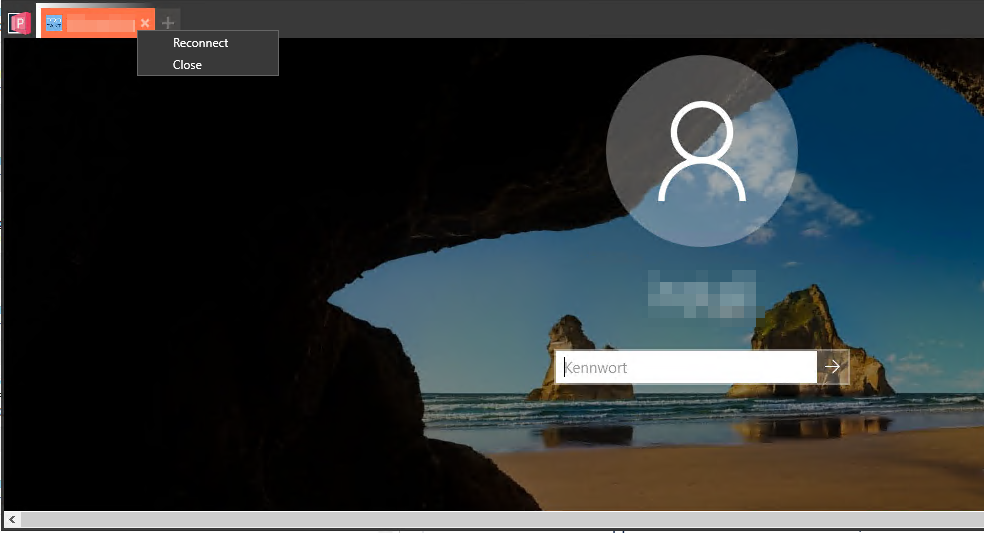
We have an active GPOs where after a certain period of inactivity the session is locked and with the reconnect button I save myself from entering the password.
Yes, I knew I use too much RDP :D, some days I use only 1 or 2 connections. But most of the time your software is open and running and at least in the background :).
Yes, I also found the solutions regarding both errors. But I don't think it has anything to do with the graphics stack or not installed windows Updates.
Because I could open and run the older RDP solution "Remote Desktop Connection manager v2.7" for days without any problems, on the same server.
And we install the new Windows updates shortly after release.
And the server is a Win Server 2019.
I know it's hard to debug or find :/.
Thanks for your help
Greetings :)
@VShawn commented on GitHub (Apr 8, 2021):
Ahhh I see, I will try this reconnect issuse first. my remote will not lock itself automaticly, so I never met this issue even I open the remote session the whole day before.
But don’t expect too much, I’m very busy in work and life recently and don’t have much time on the project. 😕
Then maybe it related to the version of
AxInterop.MSTSCLib.dll, PRM‘s mstsc.dll was build on my personal computer, don't know if it will affect.I don’t have a clue for other errors. The most annoying is that I can‘t reproduce them 😑. Especially
10 RDP sessions activemy device doesn't allow me to open 10 of virtual windows.find a same error on mRemoteNG. https://github.com/mRemoteNG/mRemoteNG/issues/1843
@xperia-droid commented on GitHub (Apr 8, 2021):
Yeah I got the same behavior as from mRemoteNG#1843.
If I can't reconnect it disappears with black screen, and when I want to connect to the same server it shows a short time a black screen and then it disappears again. Can try it multiple Times only closing your software and restarting helped it.
Log from multiple tries:
@VShawn commented on GitHub (May 10, 2021):
I active 2 rdp sessions for 3 days. But remote Windows didnt lock down, it looks like my machines have no policy to lock desk
automatically after a long period of inactivity.
@stetze commented on GitHub (Dec 13, 2021):
I have the Same error with the Windows Store Version.
I work with multiple (5-10) RDP Windows over the day.
At some Point you suddenly can no longer Start new connections. These will be closed directly again. It Only helps to close the Software completely, After That it Works Again. Which log files can i view and Upload for this?
I have Windows 11 pro.
@VShawn commented on GitHub (Dec 14, 2021):
@stetze88 it's good to have some log data thanks bro
@VShawn commented on GitHub (Feb 17, 2022):
👋 Hello, this issue has been marked as stale because it has not had recent activity.
Feel free to reopen it if any new discover .