mirror of
https://github.com/1Remote/1Remote.git
synced 2026-04-25 05:26:04 +03:00
[GH-ISSUE #59] WinScp connection type #1003
Labels
No labels
area-configuration
area-ct-app
area-ct-rdp
area-ct-remoteapp
area-ct-ssh
area-ct-vnc
area-launcher
area-list
area-tags
area-teamwork
bug
chore
dependencies
general-build/ci
general-performance
general-refactor
general-security
general-supportive
general-ux
meta-documentation
meta-enhancement
meta-enhancement
meta-feature
meta-help-wanted
meta-unknown-error
priority-hi
priority-low
pull-request
question
resolution-duplicate
resolution-invalid
resolution-wontfix
stale
task-put-off
task-still-considering
task-working-in-progress
No milestone
No project
No assignees
1 participant

Notifications
Due date
No due date set.
Dependencies
No dependencies set.
Reference
starred/1Remote#1003
Loading…
Add table
Add a link
Reference in a new issue
No description provided.
Delete branch "%!s()"
Deleting a branch is permanent. Although the deleted branch may continue to exist for a short time before it actually gets removed, it CANNOT be undone in most cases. Continue?
Originally created by @majkinetor on GitHub (Jan 13, 2021).
Original GitHub issue: https://github.com/1Remote/1Remote/issues/59
We could have WinScp type of connection, the same way we use kitty.
WinScp is stable, automatable and awesome, and it has some unique features, such as real time copy of changed local files to remote.
/cc @VShawn
@VShawn commented on GitHub (Jan 14, 2021):
2 problems we facing:
@VShawn commented on GitHub (Jan 14, 2021):
try mRemotNG with WinScp, got UX fail when integrate.
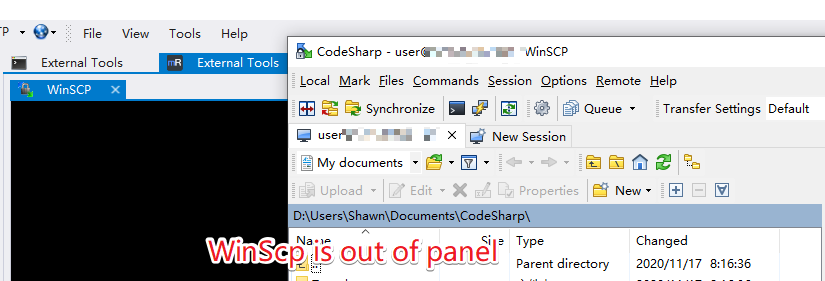
@majkinetor commented on GitHub (Jan 14, 2021):
ConEmu does this - it can embed any GUI into its frame.
@majkinetor commented on GitHub (Jan 14, 2021):
Here is how it looks like in ConEmu as a split.
This is also unmodified kitty, in a tab:
It wouldn't work immediately by just calling kitty as it will open settings editor and console will not catch it. I also tried with a saved session and used command
kitty -load <session_name>but it still was out of ConEmu window.. However, I used ConEmu acommand Attach to_ which lets you select any running executable and then it worked. Command line optionclassnameto define a specific class name for the window might help in automating this and that means that unmodified kitty can be used. This could lead to PRM options of the form use available local tools where PRM just requires they are on the PATH by default or lets you specify full path. Also, not having to rebase your work on top of latest kitty is huge improvement, and will allow people to update kitty (and potentially other tools PRM uses) via other means such as chocolatey.I see in your kitty_PRM commit that you had to find last hwnd, which can probably be avoided by starting it, waiting for the class and obtaining its hwnd, then changing its parent using Windows API.
Thats why it is in Limbo milestone, at this point I just recorded it as idea and to have historic reference in case somebody else is interested.
Not sure why you think its not OK ? Why is this ANY different then embedding kitty ? Are you concerned about the size of the final product ? I
@VShawn commented on GitHub (Jan 14, 2021):
yes I wanna keep the tool tiny and simple, in my early design PRM was just a launcher, it will work with rdprunner.exe/putty.exe/sftp.exe/e.t. And putty was never been modified at that time. But I finally find it difficuly to handle RDP toggle between fullscreen and window, PuTTY always meeting UX problems in this mode.Then RDP become a Native component of PRM and KiTTY was rebased.
Now I still hope to be able to keep this mode of integrating external apps.The more apps we integration, the less code for us to maintain, only if we can fix UX problems.
BTW you can run KiTTY without opening editor with
@majkinetor commented on GitHub (Jan 14, 2021):
We could also offer 2 versions - one with tools, other without them. Not sure if its worth it the hessle.
That is similar to
-loadand it behaves the same in ConEmu - the main kitty exe seems to exit asap and relaunch in either scenario.Not only that, but security will be better (as you can keep tools up to date no matter what is in PRM), and that way it allows for potential cross platform (you can't really pack binaries for each system...).
@VShawn commented on GitHub (Jan 15, 2021):
Today I managed combine PRM with original latest kitty_portable.exe,
I create a new thread to watch KiTTY, when KiTTY gets focus I make Tab window to top by
BringWindowToTop(hwnd), it successfully replaced what I have modified in KittTY_PRM. And it works great so far. So now we can@majkinetor commented on GitHub (Jan 15, 2021):
Great work :)
@VShawn commented on GitHub (Jun 12, 2021):
cant get the handle of winscp.
winscp.exe sftp://root:root@127.0.0.1:122, it open a winscp launcher and now I can get handle of the laucher byMainWindowHandle.MainWindowHandlebecome 0, I don't know how to get the handle of the sftp window opened by the winscp launcher. Find handle by PID(FindWindowEx) returns 0 handle,@majkinetor commented on GitHub (Jun 12, 2021):
Have you seen this page ?
Maybe you could try with
winscp.com. If that doesn't work, I can look into getting the handle.@VShawn commented on GitHub (Jun 18, 2021):
isn't
winscp.coma console interface tool? we need GUI.@majkinetor commented on GitHub (Jun 18, 2021):
OK. Will check it out
@VShawn commented on GitHub (Jun 23, 2021):
I've made some progress on integrate winscp.exe
@majkinetor commented on GitHub (Jun 23, 2021):
Awesome mate.
@majkinetor commented on GitHub (Jun 23, 2021):
Do you have any plans on bundling it or using the system one ?
@VShawn commented on GitHub (Jun 23, 2021):
Not now, I‘d like to bundle it after we port to .Net5 (or after a refactoring).
@majkinetor commented on GitHub (Jun 23, 2021):
You talk about winscp right ? Not .net itself ?
If so, how do you find winscp ? On PATH or via config or ... ?
@VShawn commented on GitHub (Jun 23, 2021):
sorry I misunderstood
using the path
C:\Program Files (x86)\WinSCP\WinSCP.exedefault, if WinSCP.exe not existed, then turn to the current ftp manager. User can custom the path too.@majkinetor commented on GitHub (Jun 23, 2021):
FYI, that path wont work on x32 bit windows, and wont work if user customized folders.
I would use the following approach instead:
(Get-Command winscp -ErrorAction 0).Path(Get-UninstallRegistryKey -SoftwareName 'WinScp *').InstallLocation(not native PowerShell function, see hereThe above approach will make it work always.
@VShawn commented on GitHub (Jun 25, 2021):
With a permanent timer
There are still many things.You know Winscp first opens the launcher and then the main interface. So I using a timer to detect the main form (
MainWindowHandle) of the progress , and once the main form changes, I will embed the new main form into my window. This worked well before I opened theaboutof WinSCP. Once I opened about form (or other forms of winscp), the whole program would get stuck for a while, and then I could do nothing to the WinSCP.Without a permanent timer
After that, I changed my mind and detect the main window only within 5s after WinSCP opening. Everything works great with my LAN ftp, but this must ensure:
We cannot guarantee these.
And if user gives a wrong password, WinSCP return a password dialog, main interface of winscp will come after this dialog:
But without a permanent timer we can never get the handle of winscp main interface 5 seconds later after process start.
The above experiences are quite unsatisfactory.
This does not consider other APPs. If an app keeps updating its main window, we will be unable to do anything about it.